|
Exercise (Set Tab
Stops)
- Open a new document under
Microsoft Word.
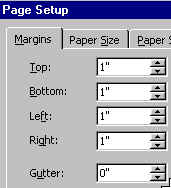
- Click File on the Menu
bar. Choose Page Setup.
- Click the Margins
tab.
- Set both left and right margins
at 1"
- Click Format on the menu
bar. Choose Tabs.
- In the Tab stop position:
box enter 0.5

- Under Alignment, click
Left

- Click the Set button

- In the Tab stop position:
box enter 1.75
- Under Alignment, click
Left
- Click the Set button
- In the Tab stop position:
box enter 3
- Under Alignment, click
Right

- Click the Set button
- In the Tab stop position:
box enter 4
- Under Alignment, click
Center

- Click the Set button
- In the Tab stop position:
box enter 6
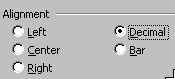
- Under Alignment, click
Decimal
- Click the Set button
- Clcik the OK
button.
- Type in the following information, putting in one tab space
between the columns:
| Name |
ID |
Date |
Region |
Commission |
| Sandy Smith |
045 |
Nov. 98 |
Region 1 |
$43.00 |
| Tom Johnston |
213 |
Dec. 97 |
Region 4 |
$345.23 |
| Barb Lee |
145 |
Feb. 99 |
Region 2 |
$54.09 |
| David Scott |
087 |
Feb. 99 |
Region 2 |
$13.23 |
| Laura Sims |
435 |
May 99 |
Region 2 |
$78.25 |
- Start a new page by : Clicking
Insert on the Menu bar. Choosing Break, then Clicking Next
Page.
- Click Format on the Menu
bar. Choose Tabs. Click the Clear All
 button to clear all tabs button to clear all tabs
- Set new tab stops
at:
Left: 0.5"
Right: 3"
Center: 4"
Decimal:
5.5"
- Type in the following
information, putting in one tab space between the columns:
| 8
1/2" * 11 Papers |
40 Cases |
Brandon, MB |
$200.00 |
| 8
1/2" * 14 Papers |
35 Cases |
Winnipeg, MB |
$180.00 |
| 3
1/2" Floppy Disks |
40 Boxes |
Toronto, ON |
$100.25 |
| Report Covers |
50 Boxes |
Ottawa, ON |
$123.78 |
| HP Printers |
2 |
Vancouver, BC |
$1234.45 |
| Sony 15" Monitor |
1 |
Calgary, AB |
$832.45 |
- Save your document.
|