|
If the
form-filler matches one of two conditions (married or have common- law spouse)
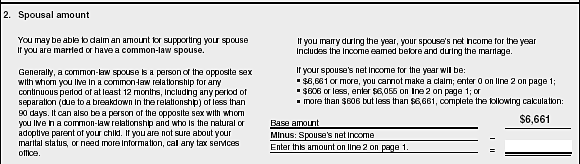
they are asked to see section 2 on page 3. This is an easy locate at Level 1.
No explicit instructions are offered if you don’t match these conditions,
but it is not difficult to infer that one carries on to the next item. (Forms
with complete navigation instructions are generally easier to fill
in.)
To determine
the actual spousal amount, the form filler has to identify the net income from
his/her spouse and compare this to three ranges: over $6,661; less than $606;
and between $606 and $6,661.
Actually
fitting the spouse’s income into a list of three ranges is a integration
task which rates 3 on the ‘type of match’ rubric for document
processing. It is an integration task (3); compare (+0); 1 feature match (+0);
1 item response (+0); literal match (+0); no new information frame (+0). The
type of information requested is an action, rated at 2. While most people will
be able to identify spouse’s income, it is probable that some will
not match the second feature of the locate, the word ‘net,’
and will carry on with the task with spouse’s gross income. The
possibility of using the wrong income amount is a plausible distractor for the
requested information.
The
calculation that results if the spouse’s income is in the middle of the
income range is not demanding. The numbers are in column format (+0); the
numbers are adjacent (+0); the operation is identified with mathematical
symbols (+0); the numbers are present (+0); units require no transformation
(+0); total rating for operational specificity is 0. The type of operation is a
single subtraction, which is rated at 2 (slightly more difficult than a single
addition) Again, net and gross income may be confused, so there is a plausible
distractor for the requested information. |
|
Type
Document. |
Level
2 |
|
ToI
2 |
ToM
3 |
PoD
2 |
|
Type
Quant. |
Level
1 |
|
ToO
2 |
SoO
0 |
PoD
2 |
|