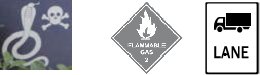
SKILLBUILDER: SYMBOLS AND ICONS
What is a symbol?
- A symbol is a picture, shape or letter that represents an object, action or idea.
- A symbol does not look like the object, action or idea it represents.
- A symbol’s meaning has been agreed upon by society, industry, government, a user group,
etc.
- A symbol’s meaning must be taught and learned (e.g.) most WHMIS and TDG symbols
What is an icon?
- An icon is a picture that represents an object, action or idea.
- An icon looks like the object, action or idea it represents.
- An icon’s meaning is intuitive (automatic or instinctive).
What is a computer icon?
- A computer icon is a picture on a computer screen that you click to produce an action.
- The computer icon usually looks like the action or idea it represents.
- A computer icon in many cases is the creation of Microsoft.
Advantages of using icons and symbols
- Icons can be quickly understood.
- Symbols and icons can be “read” at a glance.
- Symbols and icons are easier for low literacy or non-native language speakers to understand.
- Icons can be understood by young children.
- Icons and symbols are more visually recognizable than words.
- Icons and symbols are more “compact.”
Parts of an icon or symbol
- An icon may be made up of several parts: a picture (a requirement), border (optional),
background (optional), and label (optional).
- If the meaning of an icon is not obvious, a label can be added. A picture plus a text label can
be understood faster than a picture alone (unless the picture is self-explanatory).