|
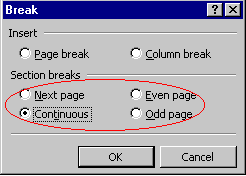
Section Five: Sections and Multi-Columns Section Breaks There are several types of section breaks: Next Page break, Continuous break, Odd Page break, and Even Page break. Next Page break ~ will start the new section on the next page. Continuous break ~ will start the new section on the same page. Odd Page break ~ will start the new section on the next odd numbered page. Even Page break ~ will start the new section on the next even numbered page. To Create a Section Break
To Delete a Section Break
|
| Back | Index | Next |