|
Practice I:
- Click Start
 , choose
Programs, click Microsoft Word to open your Microsoft Word 97 and
type the sentence below into your computer: , choose
Programs, click Microsoft Word to open your Microsoft Word 97 and
type the sentence below into your computer:
If he had given directions more
accurate we would have arrived much earlier.
- Now, move the cursor directly
after the word accurate, type the letters ly.
- Your revised sentence should
look like this:
If he had given directions more
accurately we would have arrived much earlier.
- Press Ctrl + End to
bring your insertion point to the end of your document.
- Hit the Enter key three
times to insert two blank lines.
Practice II:
- Type the following
sentence:
She is the most silliest girl I
know.
- Now, move the cursor directly
after the word the and press the Delete key 5 times on your
keyboard to delete the space and the word most.
- Your revised sentence should
look like this:
She is the silliest girl I
know.
- Press Ctrl + End to
bring your insertion point to the end of your document.
- Hit the Enter key three
times to insert two blank lines.
Practice III:
- Type the following
sentence:
Sandy's essays are neatly done
than Pam's.
- Now, move the cursor directly
before the word neatly, type the word more and press the space
bar.
- Your revised sentence should
look like this:
Sandy's essays are more neatly
done than Pam's.
Now, let's try to minimize
Microsoft Word.
- Click the Minimize
button on the Title bar to minimize Microsoft Word.

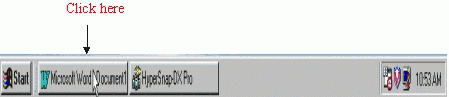
Your Microsoft Word window has just
turned into a button on the Task bar. Now, let's try to restore the Microsoft
Word window
- Click the Microsoft Word button
on the Task bar again to restore Microsoft Word.
Click the Close button on
the Title bar to close Microsoft Word.

We do not want to save this
document, therefore when the computer asks you Do you want to save the
changes you made to Document1? Click No. |