|
Exercise (Draw and Format
Objects)
|
I like drawing. Drawing is
fun. |
- With the text box still
selected, enlarge the text box so that all text it contains can be
seen.
- With the text box still
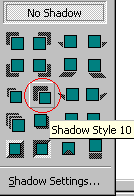
selected, click the Shadow
 button on the Drawing toolbar and apply Shadow Style 10.
- Click to select the 8-point
star.
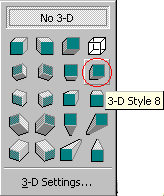
- Click 3-D
 button on the Drawing toolbar and apply 3-D Style 8.
- Click the Text Box
 button on the Drawing toolbar.
- Position the mouse pointer
below the star.
- Draw a text box.
- Type the following text into
the text box: I used the AutoShapes feature on the Drawing toolbar to draw this
8-point star.
- With the text box still
selected, enlarge the text box so that all text it contains can be
seen.
- Click the Arrow
 button
on the Drawing toolbar. button
on the Drawing toolbar.
- Position your mouse pointer on
the top border of the text box which you have just created.
- Draw an arrow pointing to the
star.
- Click the AutoShapes
 button on the Drawing toolbar.
- Select Callouts, click the Oval
callout button.
- Position your mouse pointer in
the top right corner of the page.
- Draw an oval callout
approximately 2 inches by 2 inches.
- Save your file as
"MyFirstDrawings".
- Your drawings should look
something like the following.
- Close your
document.
 |
