|
Exercise (Customize Outline
Numbered List)
Open your file MyToDoList if
it is not already opened.
Select the entire list. (From Brandon Shoppers
Mall to Ask her to scan pictures for me.)
Click Format on
the Menu bar.
Choose Bullets and Numbering.
Click the Outline
Numbered tab.
Choose the design as shown below:

Click the Customize button.
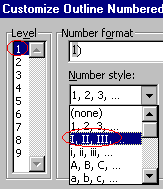
Click 1 in the Level box.
Click the Number style
drop-down arrow, choose I, II, III,:
Click 2 in the Level
box.
Click the Number style drop-down arrow, choose A, B, C,:

In the Number position box,
enter 0.5" in the Aligned at box.

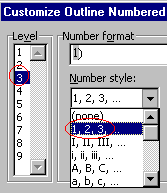
Click 3 in the Level
box
Click the Number style drop-down arrow, choose 1, 2,
3,:
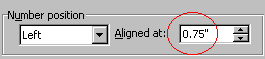
In the Number position box,
enter 0.75" in the Aligned at box.
Click OK.
Your document
should look something like this:
To do list for:
November 17, 2000
- Brandon Shoppers Mall
- Go to Super Thrifty Drug
Mart to pick up mail from postal box
- Withdraw $200.00 at Scotia
Savings account
- Buy 15-page protectors at
Christie Office Plus
- Return movie tape at Rogers
Video
- Superstore
- Pharmacy
- Refill prescriptions
for Tyler
- Pick up cough
candies
- Photos Department
- Drop off film for
developing
- Pick up 2
videotapes
- Downtown
- Pick up Barb's ring at
Zeke's
- Talk to Kathy at Canada
Trust
- Ask her about car
loan
- Remind her to order
cheques for me
- Aunt Sandy
- Return bread
maker
- Ask her to scan pictures
for me
|