|
Exercise (Use Letter Wizard to
Create a Personal Letter)
- Open a new document under
Microsoft Word.
- Click Tools on the Menu
bar. Choose Letter Wizard.
- Click the Date line
check box.

- In the Choose a page
design field click the drop-down arrow.
- Select Contemporary
Letter.
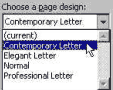
- In the Choose a letter
style field click the drop-down arrow.
- Select Full
block.

- Click the Recipient Info
tab.

- Type Peggy Jones
in the Recipient's name field.
- Press Tab key to move to
the Delivery address field.
- Enter 9876 Victoria
Ave.
Brandon, Manitoba
R1A 2B3
- In the Salutation box choose
Informal.

- Click the Sender Info
tab.

- Enter your name in the Sender's
name field.
- Press Tab key to move to
the Return address field.
- Enter 7788 Rosser
Ave.
Brandon, Manitoba
R1B 2V3
- Click on the drop-down arrow in
the Complimentary closing field.

- Choose Sincerely
yours,
- Click OK.
- Now enter the following two
paragraphs in your letter.
Your invitation to my family to
join yours for Thanksgiving dinner was greeted with hurrahs from everyone.
We're looking forward to seeing you and Tom again, and, as you know, we love
your twins dearly, so it will be a treat to spend some time with them.
Following your suggestion, we'll
arrive at 4 p.m., with appetites sharpened to a nice edge. Thanks so much for
this wonderful invitation.
- Save and print your
letter.
- Your completed letter should
look something like this:
|
7788 Rosser Ave.
Brandon, Manitoba
R1B
2V3
|
|
May 16, 2000
Peggy Jones
9876 Victoria
Ave.
Brandon, Manitoba
R1A 2B3
Dear Peggy,
Your invitation to my family
to join yours for Thanksgiving dinner was greeted with hurrahs from everyone.
We're looking forward to seeing you and Tom again, and, as you know, we love
your twins dearly, so it will be a treat to spend some time with them.
Following your suggestion,
we'll arrive at 4 p.m., with appetites sharpened to a nice edge. Thanks so much
for this wonderful invitation.
Sincerely yours,
Joe Boles |
|