|
ClipArt
Word 97 comes with a built-in
library of clip art graphics files.
Insert ClipArt
To Insert a ClipArt to Your
Document:
- Click Insert on the Menu
bar, choose Picture, ClipArt.
- Click the ClipArt tab on
the Microsoft Clip Gallery dialogue box.
- Select the clip art you
desire.

- Click the Insert
button.
Select ClipArt
Click on the ClipArt to select
it.
Resize ClipArt
- Click on the clip art to select
it.
- Click and drag the selection
handle of the clip art to resize the clip art.
(If you drag a side handle you
will only resize that side. If you drag a corner handle you will resize in two
directions at once.)

Or
- Right click on the clip art,
choose Format Picture.
- In the Format Picture
dialogue box, click the Size tab.
- Enter the measurements in the
Height and Width boxes.
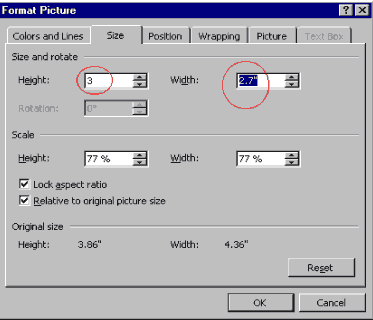
- Click OK.
Move ClipArt
- Click to select the
ClipArt.
- When the mouse pointer turns
into a four-headed
 arrow, click and drag to move the ClipArt to the location
you desired. arrow, click and drag to move the ClipArt to the location
you desired.
Delete ClipArt
- Select the ClipArt you
want to delete.
- Hit the Delete key on
your keyboard.
Deselect ClipArt
- Click anywhere outside the
ClipArt to deselect it.
|