|
Exercise (Create and Format a
Table)
- Using the Insert Table
 button on the toolbar, create a table with 10 rows and 4
columns button on the toolbar, create a table with 10 rows and 4
columns
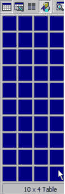
- Enter the following information
into the table:
| Monthly Payroll |
|
|
|
| |
Rate Per Hour |
Hours Worked |
Gross |
| Jason Smith |
$8.50 |
130 |
$1105.00 |
| Terry Jones |
$10.00 |
140 |
$1400.00 |
| Maria Hall |
$6.00 |
100 |
$600.00 |
| Victoria Long |
$8.25 |
125 |
$1031.25 |
| Don
Johnston |
$7.35 |
111 |
$815.85 |
| Jack
Adams |
$12.00 |
99 |
$1188.00 |
| Pearl Brown |
$15.55 |
150 |
$2332.50 |
| Rick
Green |
$13.13 |
123 |
$1614.99 |
- Click Table on the Menu
bar. Choose Select Table.
- Click Format on the Menu
bar. Choose Borders and Shading.
- Click the Borders
tab.
- Under Setting, choose
None.
- Click OK. (Now your
table has no border)
- Bold and underline the
headings: Monthly Payroll, Rate Per Hour, Hours Worked, and
Gross.
- Apply Gray - 30%
shading for these headings.
- Apply Gray - 15%
shading for the rows 4, 6, 8, and
10.
- Save and print your
table.
- Your table should look
something like this:
| Monthly Payroll |
|
|
|
| |
Rate Per Hour |
Hours Worked |
Gross |
| Jason Smith |
$8.50 |
130 |
$1105.00 |
| Terry Jones |
$10.00 |
140 |
$1400.00 |
| Maria Hall |
$6.00 |
100 |
$600.00 |
| Victoria Long |
$8.25 |
125 |
$1031.25 |
| Don
Johnston |
$7.35 |
111 |
$815.85 |
| Jack Adams |
$12.00 |
99 |
$1188.00 |
| Pearl Brown |
$15.55 |
150 |
$2332.50 |
| Rick Green |
$13.13 |
123 |
$1614.99 |
|